
Threat Hunting: Windows vs. Android (Or, Why You Can’t Just "Look at the Kernel")
Notes from the trenches of trying and (mostly) failing to hunt for threats on Android devices

If you’re coming from the Windows security world, welcome to Android. Please check your kernel drivers at the door.
In Windows, security tooling usually runs as NT AUTHORITY\SYSTEM. You get ETW, deep process injection visibility, and a front-row VIP seat to the kernel. You own the machine.
On Android? If you don’t have root, you aren’t the bouncer. You are just another unprivileged app shivering in the sandbox, hoping the OS throws you a bone.
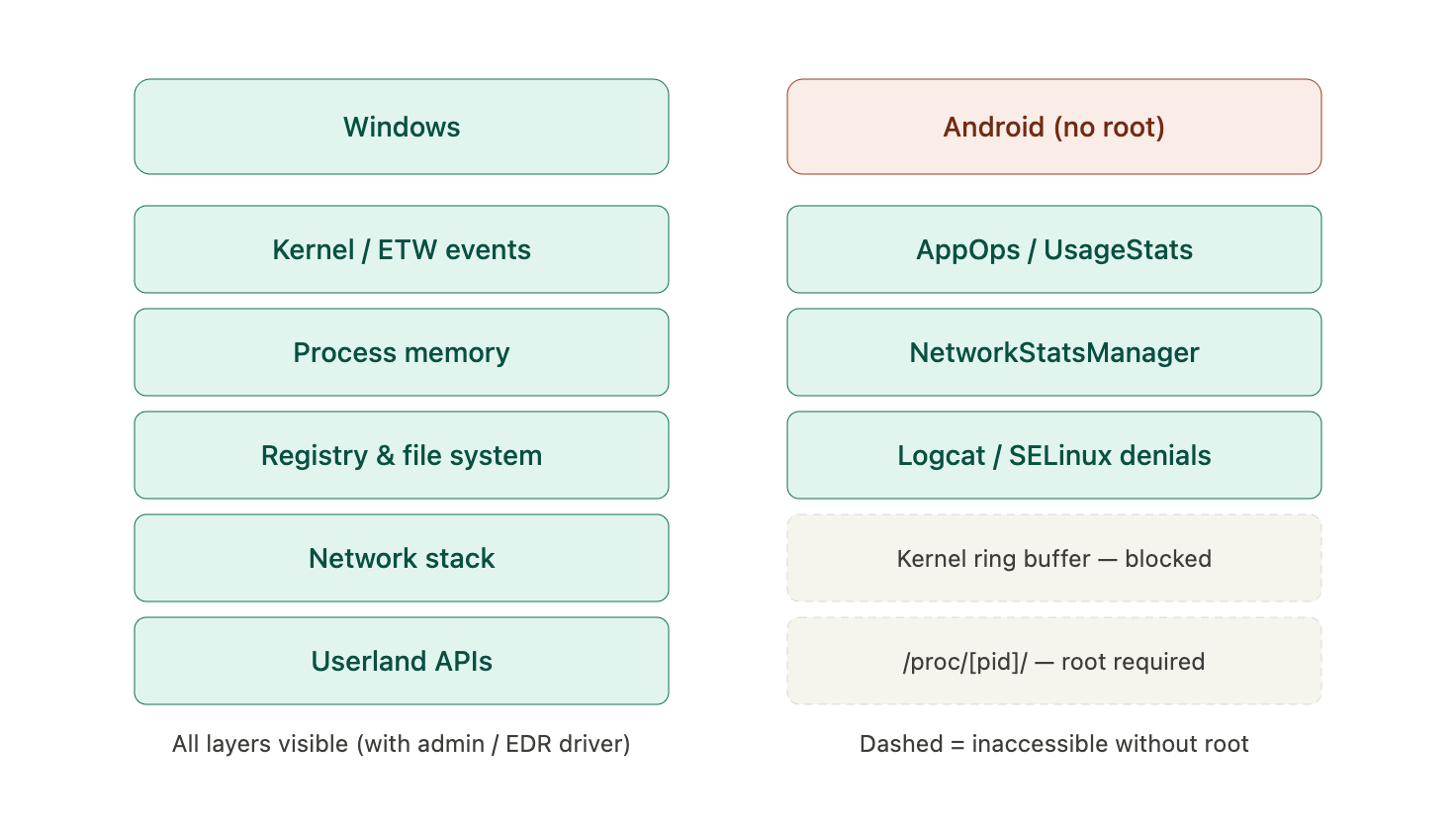
You can’t read dmesg. You can’t parse kernel logs. You can’t even traverse /proc/[pid]/ because Android uses hidepid=2 to ensure you are entirely blind to what your neighbors are doing. So, how do you actually detect malware when the operating system treats you like a potential threat?
You get creative with the userland APIs.
1. The Userland Detective Toolkit
Since you can’t go deep, you have to go broad. You can only request information that is allowed to the “general populace,” but if you look closely, Android actually exposes some incredibly useful behavioral telemetry.
AppOpsManager is Your Friend
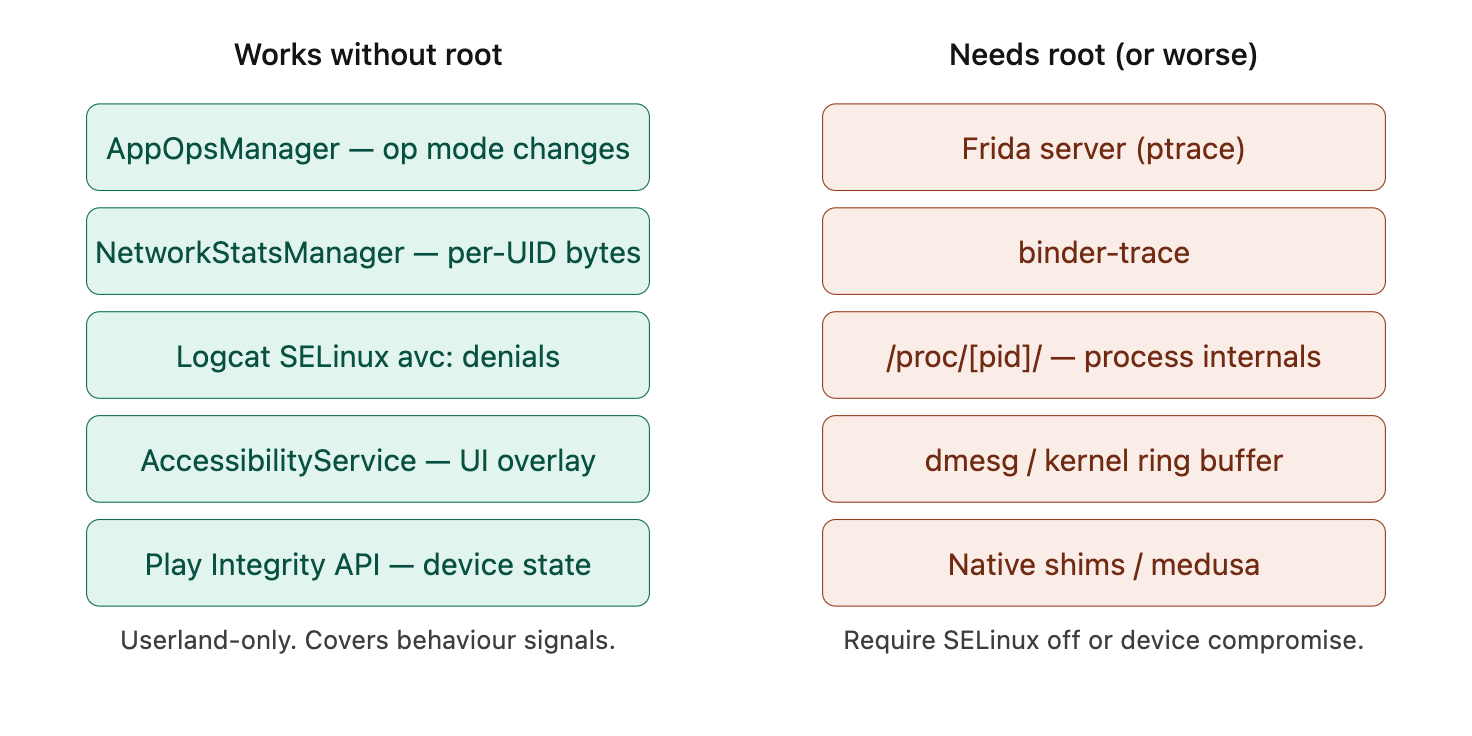
You might not see the exploit execute, but you can see the intent. By hooking into AppOpsManager.OnOpChangedListener, you can monitor operational mode shifts across the device. For example, watching an application’s SMS capability spontaneously flip from MODE_IGNORED to MODE_ALLOWED is a massive behavioral red flag.
The “Stats” Family
Since /proc is locked down, lean on aggregated telemetry.
UsageStatsManager (requires user consent) reveals foreground time and last-used timestamps.
NetworkStatsManager tracks per-UID bytes sent and received, which is invaluable for catching silent data exfiltration.
StatsManager / JobScheduler can hint at abuse—like sudden CPU spikes indicating hidden crypto-mining or aggressive background tasking.
Crash Diagnostics
You can natively monitor your own process via Thread.setDefaultUncaughtExceptionHandler to catch malformed IPCs or memory corruption attempts targeting your app. While you can’t natively see other apps crashing, you can scavenge. Many apps ship SDKs that collect anonymized crash dumps. Parsing these logs for native crashes in system libraries can occasionally expose the blast radius of memory corruption attempts happening elsewhere.
2. The Blind Spots
Let’s be brutally honest about what we can’t see.
Without root, kernel-level exploits, CVE-style privilege escalations, and sandbox escapes are entirely opaque. If an attacker successfully escapes the sandbox, your unprivileged telemetry app won’t see a damn thing. You are effectively relying on the attacker making noise in the UI or triggering an API threshold.
3. Sifting Through the Logs
If you have ADB access, logcat is your lifeline.
You want to hunt for SELinux Denials. Look for avc: messages. These policy violations are piped to both the kernel ring buffer and logcat, making them a goldmine for spotting apps trying to reach files or sockets they shouldn’t.
Pro-Tip: Don’t stare at monochrome text until your eyes bleed. Filter and colorize:
Bash
adb logcat -b all -v color --pid=$(adb shell pidof -s com.blah.targetapp)
If you prefer a GUI over terminal blindness, drop vanilla logcat and grab a utility like Logcatch.
4. The UI and Integrity Play
For higher-level attacks, you have to rely on UI context and state.
AccessibilityService API: This is a classic double-edged sword. Malware uses it constantly for tapjacking, but defenders can use it to detect UI-level phishing or overlay attacks.
Device Integrity: You can monitor state changes using the same environmental signals the Play Integrity API uses to detect if a device has drifted from a “safe” state.
The Bottom Line
Without root, Android threat hunting is an exercise in shadow-reading. You are inferring malicious behavior from user-land ripples rather than kernel-level waves.
For true, deep dynamic analysis, you still need a lab environment. Tools like Frida (which can work non-rooted via an injected gadget, but it’s a hassle), binder-trace, and medusa generally require root, disabled SELinux, or deliberately vulnerable configurations to really sing.
But for production telemetry out in the wild? Learn to love the APIs.